REST API vs WebSocket for Live Cricket Scores
Compare REST APIs and WebSockets for live cricket score applications. Learn when to use polling, event streaming or a hybrid architecture, with practical reconnection, caching and duplicate-event handling examples.
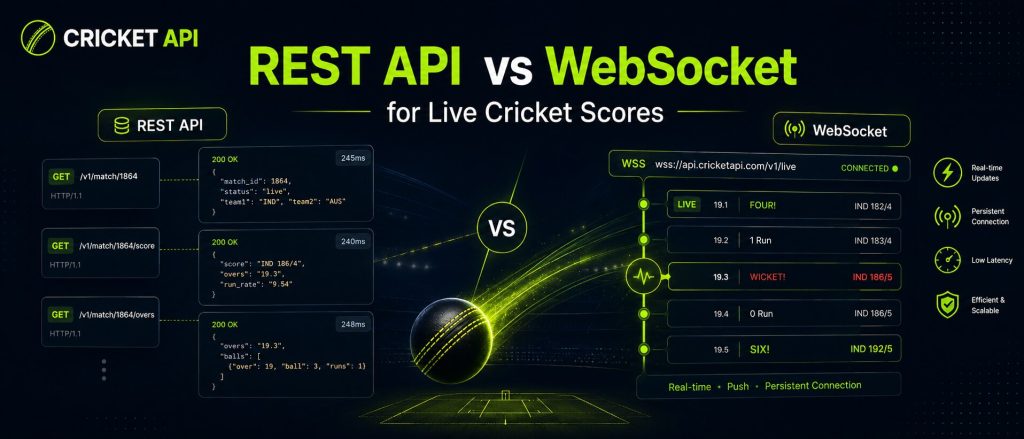
When developers build a live cricket score application, one of the first architecture decisions is whether to use a REST API, a WebSocket stream or both. The correct answer depends on how quickly the interface must update, how much traffic the application receives and how reliably it must recover from network interruptions.
REST is excellent for retrieving the current state of a match. WebSocket is better suited to continuous event delivery. In most production cricket applications, the strongest architecture combines both: REST for fixtures, scorecards and state recovery, and WebSocket for live ball-by-ball updates.
REST API and WebSocket in Simple Terms
What Is a REST API?
A REST API follows a request-and-response model. Your application asks for a resource, such as the latest match state, and the server returns a response. The connection normally ends after the response is delivered.
Client request:
GET /v1/cricket/matches/match_84219

Server response:
{
  "match_id": "match_84219",
  "status": "live",
  "score": "148/4",
  "overs": "16.2"
}
To keep a live scoreboard current with REST alone, the application repeats the request at an interval. This process is called polling.
What Is a WebSocket?
A WebSocket creates a persistent two-way connection between the client and server. After subscribing to a match, the server can send new events as they become available without waiting for a new HTTP request each time.
Client:
{
  "action": "subscribe",
  "match_ids": ["match_84219"]
}

Server event:
{
  "event_id": "event_991827",
  "match_id": "match_84219",
  "type": "boundary",
  "runs": 4,
  "over": "16.2"
}
REST API vs WebSocket: Quick Comparison
| Area | REST API | WebSocket |
|---|---|---|
| Communication model | Request and response | Persistent event stream |
| Best for | Fixtures, current state, scorecards and history | Live scores and incremental match events |
| Update method | Polling | Server pushes events |
| Implementation complexity | Lower | Higher |
| Connection management | Minimal | Reconnect and heartbeat logic required |
| Recovery after failure | Request the latest state again | Reconnect, then reconcile with REST |
| Efficiency for frequent updates | Can create repeated requests | Efficient for continuous event delivery |
| Historical data | Excellent | Usually unnecessary |
How REST Polling Works for Live Cricket Scores
With polling, your application requests the current match state repeatedly. For example, it may request the score every five seconds while the match is live.
async function pollLiveMatch(matchId) {
  const response = await fetch(
    `/api/live-matches/${matchId}`
  );

  if (!response.ok) {
    throw new Error(
      `Unable to load match: ${response.status}`
    );
  }

  return response.json();
}

const intervalId = setInterval(async () => {
  try {
    const match = await pollLiveMatch('match_84219');
    updateScoreboard(match);

    if (match.status === 'completed') {
      clearInterval(intervalId);
    }
  } catch (error) {
    showStaleDataWarning();
    console.error(error);
  }
}, 5000);
Advantages of REST Polling
- Simple to understand and implement
- Works with standard HTTP infrastructure
- Easy to test with browsers, command-line tools and API clients
- Suitable for fixtures, schedules, scorecards and completed matches
- Recovery is straightforward because the app requests current state again
- Serverless and traditional hosting platforms usually support it easily
Limitations of REST Polling
- The app may request data even when nothing has changed
- Short polling intervals can consume request quotas quickly
- Each user’s browser can multiply external request volume
- Updates arrive only after the next polling request
- Frequent polling can create traffic spikes during major matches
How WebSocket Streaming Works for Cricket Events
A WebSocket client establishes a connection, authenticates and subscribes to one or more matches. The server then sends events as the match changes.
import WebSocket from 'ws';

const socket = new WebSocket(
  'wss://stream.example.com/v1/cricket',
  {
    headers: {
      Authorization: `Bearer ${process.env.CRICKET_API_KEY}`
    }
  }
);

socket.on('open', () => {
  socket.send(
    JSON.stringify({
      action: 'subscribe',
      match_ids: ['match_84219']
    })
  );
});

socket.on('message', rawMessage => {
  const event = JSON.parse(rawMessage.toString());

  processCricketEvent(event);
});

socket.on('error', error => {
  console.error('WebSocket error', error);
});

socket.on('close', () => {
  scheduleReconnect();
});
Advantages of WebSocket Streaming
- New events can arrive without repeated HTTP requests
- Well suited to wickets, boundaries and ball-by-ball updates
- Reduces unnecessary requests when the score does not change
- Supports reactive interfaces and live notifications
- One backend stream can feed many connected users
Limitations of WebSocket Streaming
- Connection management is more complex
- The app must reconnect after network loss
- Duplicate or missed events must be handled safely
- Some hosting platforms require special configuration
- Historical data and full scorecards still usually come from REST
- Monitoring persistent connections requires additional tooling
Why REST and WebSocket Work Better Together
A WebSocket event normally tells you what changed, not necessarily the complete state of the match. REST can provide the full current state before streaming begins and after a connection interruption.
1. Request active matches with REST
2. Request the selected match's current state
3. Render the full scoreboard
4. Connect to the WebSocket stream
5. Subscribe to the selected match
6. Apply new events as they arrive
7. Reconnect after interruption
8. Request current REST state again
9. Reconcile local state
10. Continue streaming
This hybrid architecture avoids relying on an event stream as the only source of truth.
Recommended Production Architecture
Cricket API
  |
  +-- REST endpoints
  |     |
  |     v
  |  Application backend
  |     |
  |     +-- Cache / database
  |     |
  |     +-- HTTP endpoint for browsers
  |
  +-- WebSocket stream
        |
        v
     Stream worker
        |
        +-- Update match state
        +-- Store processed event IDs
        +-- Broadcast to connected users
Do Not Give Every Browser an External WebSocket
For a small prototype, a browser may connect directly when the provider explicitly supports public-client authentication. For production, routing the stream through your backend is usually safer and more efficient.
- The external API key remains private
- One provider connection can serve many website users
- Your backend can validate and normalise events
- You can enforce rate limits and access controls
- The last known match state remains available during reconnects
Latency: Which Is Faster?
WebSocket can deliver an event as soon as the server publishes it. REST polling waits until the next scheduled request. However, total user-visible latency also depends on the upstream sports data source, provider processing, network conditions and your own application.
| Scenario | REST Polling | WebSocket |
|---|---|---|
| Score changes immediately after a poll | Waits until the next poll | Can arrive as an event |
| No match change for one minute | May still make repeated requests | No score event is required |
| Connection drops | Next request can recover state | Must reconnect and reconcile |
Request Volume and Cost
REST polling volume grows with the number of matches, users and refresh frequency when requests are not shared through a backend cache.
Example:

10,000 users
× 1 live match
× 1 request every 5 seconds
× 60 seconds
= 120,000 requests per minute

With a shared backend cache:
Your backend may request once,
then serve the same state to many users.
WebSocket can reduce repeated polling, but it introduces persistent connection and infrastructure costs. The most economical architecture depends on your traffic pattern and provider plan.
WebSocket Reconnection Strategy
Live sports applications must assume that connections will occasionally close. Use controlled reconnection rather than reconnecting in a tight loop.
let reconnectAttempt = 0;
let socket;

function connect() {
  socket = new WebSocket(
    'wss://stream.example.com/v1/cricket'
  );

  socket.addEventListener('open', async () => {
    reconnectAttempt = 0;

    const latestMatch = await loadCurrentMatchState(
      'match_84219'
    );

    replaceLocalMatchState(latestMatch);
    subscribeToMatch(socket, 'match_84219');
  });

  socket.addEventListener('message', message => {
    const event = JSON.parse(message.data);
    processCricketEvent(event);
  });

  socket.addEventListener('close', () => {
    const delay = Math.min(
      1000 * 2 ** reconnectAttempt,
      30000
    );

    reconnectAttempt += 1;

    setTimeout(connect, delay);
  });
}

connect();
Use Heartbeats When Supported
Some connections can appear open even when traffic is no longer flowing. Provider-defined ping and pong messages help detect dead connections.
- Follow the provider’s documented heartbeat format
- Track the time of the last valid message
- Close and reconnect stale connections
- Do not invent heartbeat messages the server does not support
Preventing Duplicate Cricket Events
Reconnects and distributed systems can cause an event to be delivered more than once. Your event handler should be idempotent, meaning repeated processing does not double-count the result.
async function processCricketEvent(event) {
  if (!event.event_id) {
    throw new Error('Missing event identifier');
  }

  const exists = await eventRepository.exists(
    event.event_id
  );

  if (exists) {
    return;
  }

  await database.transaction(async transaction => {
    await applyEventToMatchState(event, transaction);
    await eventRepository.save(event, transaction);
  });

  await publishMatchUpdate(event.match_id);
}- Use a unique event identifier
- Store the match-specific sequence number where available
- Apply the state update and event record in one transaction
- Reconcile against the latest full match state after reconnecting
Handling Missed Events
A WebSocket connection may close between two deliveries. When it reconnects, the application should not assume it received every event.
Recovery Pattern
- Stop presenting the local state as confirmed live
- Reconnect to the stream
- Request the latest match state with REST
- Replace or reconcile local score data
- Resume event processing from the documented sequence
- Restore the live indicator after valid updates resume
REST Polling Best Practices
- Poll from your backend rather than every browser
- Use a faster interval only while matches are live
- Slow down polling during delays and innings breaks
- Stop polling after a match is completed or abandoned
- Use conditional requests when supported
- Respect rate-limit and retry headers
- Cache responses for all users viewing the same match
WebSocket Best Practices
- Authenticate securely and rotate exposed credentials
- Subscribe only to required matches
- Unsubscribe when no users need a match
- Process messages through a queue at higher volume
- Validate every event before applying it
- Store event IDs to prevent duplicates
- Monitor connection age, message freshness and reconnect frequency
- Use REST reconciliation after every uncertain connection period
When Should You Use REST Only?
REST-only can be appropriate when:
- The application is a prototype or low-traffic internal tool
- A small delay between score refreshes is acceptable
- The provider does not offer WebSocket access
- You mainly display fixtures, results and scorecards
- Your hosting environment does not support persistent connections
When Should You Use WebSocket?
WebSocket is valuable when:
- Users expect near-continuous live-score changes
- You display ball-by-ball events
- You send wicket, boundary or milestone notifications
- Many users view the same live match
- You operate a live dashboard, fantasy app or media match centre
When Should You Use Both?
Use both for most production live cricket products. REST supplies complete and recoverable state; WebSocket supplies incremental live events.
| Product feature | Recommended delivery |
|---|---|
| Upcoming fixtures | REST |
| Initial match state | REST |
| Live ball-by-ball events | WebSocket |
| Connection recovery | REST, then WebSocket |
| Completed scorecards | REST |
| Historical statistics | REST |
Testing Checklist
- Initial REST request loads the correct match state
- WebSocket subscription succeeds
- Each live event updates the correct match
- Duplicate events are ignored
- Out-of-order events are detected or reconciled
- The interface shows update freshness
- The connection reconnects after failure
- REST restores current state after reconnecting
- Polling stops when the match ends
- The stream unsubscribes when no longer required
- API keys never appear in public output or logs
Common Architecture Mistakes
Using WebSocket as the Only Source of Truth
An event stream may not replay everything after a disconnection. Maintain a recoverable match state and reconcile with REST.
Opening One Provider Connection Per User
This can create unnecessary connection volume. A backend stream worker can receive one provider stream and broadcast updates to many users.
Polling Every Second Without Shared Caching
This can consume quotas quickly. Poll once on the server and share the response.
Assuming Messages Always Arrive in Order
Use sequence numbers, timestamps and full-state reconciliation when the provider supports them.
Keeping the LIVE Label During an Outage
Display a stale or reconnecting state when updates stop. Do not present unconfirmed data as current.
REST API vs WebSocket FAQs
Is WebSocket always faster than REST?
WebSocket can avoid waiting for the next polling interval, but total latency also depends on the provider, network and application. It does not guarantee a specific update speed by itself.
Can I build live cricket scores using only REST?
Yes. Poll the latest match state at a sensible interval and share responses through your backend cache. This is often sufficient for prototypes and moderate refresh requirements.
Do I still need REST when using WebSocket?
Usually yes. REST is useful for initial state, fixtures, full scorecards, history and recovery after a WebSocket disconnection.
How do I recover missed WebSocket events?
Reconnect, request the latest complete match state through REST, reconcile your local data and then resume streaming.
Should browsers connect directly to the provider WebSocket?
Only when the provider explicitly supports secure public-client access. A server-side stream worker is usually safer for production applications.
Which option uses fewer API requests?
WebSocket can reduce repeated HTTP polling, but it uses persistent connections. A shared backend cache can also make REST efficient. Compare both against the provider’s pricing and infrastructure requirements.
Build a Reliable Real-Time Cricket Integration
Use REST for complete match state and WebSocket for incremental live events. Protect credentials on your backend, prevent duplicate updates and reconcile every interrupted stream before showing the score as live again.
Build Cricket Products With Reliable API Data
Access live scores, fixtures, ball-by-ball updates, statistics, odds, predictions and historical cricket data through one developer-friendly API.
Get API Access