How to Add Live Cricket Odds to Your Website
Learn how to integrate live cricket odds into a website using secure server-side API requests, market normalisation, bookmaker comparison, caching, status handling and stale-price protection.
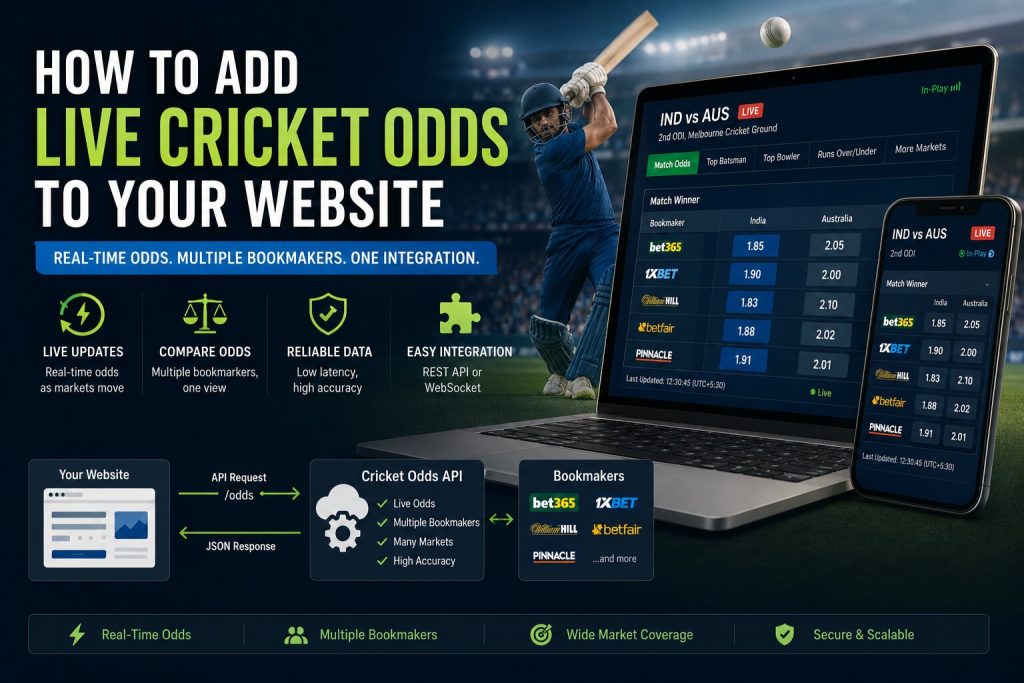
Adding live cricket odds to a website involves more than printing a bookmaker
price beside a match. A production integration must map fixtures correctly,
normalise markets and selections, track market status, preserve timestamps,
handle suspended prices and comply with the commercial and legal rules that
apply to the product.
This guide explains a practical architecture for adding pre-match and live
cricket odds to a website through a Cricket Odds API. It covers match mapping,
market structure, bookmaker comparison, caching, live updates, frontend
presentation, error handling and responsible use.
tutorial are illustrative. Replace them with the authentication method,
market definitions, bookmaker identifiers and licensing terms provided in
your final API documentation.
What You Need Before You Start
Confirm that the selected Cricket API plan includes the competitions,
bookmakers and market types your website requires.
- Upcoming cricket fixtures
- Stable match, team and competition identifiers
- Pre-match odds
- Live or in-play odds where required
- Bookmaker identifiers and names
- Market and selection identifiers
- Market status and update timestamps
- Settlement results where needed
- Commercial display and attribution rights
Do not assume every bookmaker offers every market for every cricket match.
Your interface should render only the markets returned by the API.
Recommended Cricket Odds Website Architecture
A production website should normally request odds through its own backend
rather than exposing a private provider credential in browser code.
Website visitor
      |
      v
Your application backend
      |
      +-- Fixture and odds requests
      +-- Market normalisation
      +-- Cache or database
      +-- Compliance and access rules
      |
      v
Cricket Odds API
Why Use a Backend Layer?
- Private API credentials remain hidden
- Many users can share one cached odds response
- Bookmaker and market labels can be normalised centrally
- Suspended or stale prices can be filtered consistently
- Commercial rules can be applied before data reaches the browser
- Request quotas can be monitored and controlled
Understand the Odds Data Structure
A useful odds response should preserve the relationship between the match,
bookmaker, market and selection.
match
  └── bookmaker
      └── market
          └── selection
              ├── price
              ├── status
              ├── is_live
              ├── updated_at
              └── settlement
Do not compare prices using display labels alone. Two bookmakers may use
different wording for the same market, while two similarly named markets may
have different rules.
Example Cricket Odds Response
{
  "data": {
    "match_id": "match_84219",
    "competition_id": "competition_91",
    "status": "live",
    "updated_at": "2026-08-04T11:30:18Z",
    "bookmakers": [
      {
        "bookmaker_id": "bookmaker_12",
        "name": "Example Sportsbook",
        "markets": [
          {
            "market_id": "market_match_winner",
            "name": "Match Winner",
            "status": "open",
            "is_live": true,
            "outcomes": [
              {
                "selection_id": "team_18",
                "name": "Team A",
                "price": 1.72,
                "price_format": "decimal"
              },
              {
                "selection_id": "team_29",
                "name": "Team B",
                "price": 2.10,
                "price_format": "decimal"
              }
            ]
          }
        ]
      }
    ]
  }
}
Step 1: Match Your Website Fixtures to the Odds Feed
Every odds record must connect to the correct match. Use stable match and team
identifiers rather than matching only on text.
| Field | Why it matters |
|---|---|
| Match identifier | Primary connection between fixture and odds |
| Competition identifier | Prevents similarly named teams from different events being mixed |
| Team identifiers | Handles spelling and display-name differences |
| Scheduled start time | Provides an additional verification signal |
| Match format | Distinguishes Test, ODI, T20 and other formats |
Stable identifiers should be the main mapping method.
Step 2: Request Odds for a Match
A common integration flow requests the selected match and then retrieves its
available bookmakers and markets.
Request flow

1. Load the fixture from your database
2. Read its provider match identifier
3. Request available odds for that identifier
4. Validate the returned match identifier
5. Store bookmaker, market and selection records
6. Preserve status and update timestamps
7. Return a simplified response to the website
Illustrative JavaScript Request
const matchId = 'match_84219';

const response = await fetch(
  `https://api.example.com/v1/cricket/matches/${matchId}/odds`,
  {
    headers: {
      'Authorization': 'Bearer YOUR_API_KEY',
      'Accept': 'application/json'
    }
  }
);

if (!response.ok) {
  throw new Error(`Odds request failed: ${response.status}`);
}

const payload = await response.json();
Illustrative Python Request
import requests

match_id = "match_84219"

response = requests.get(
    (
        "https://api.example.com/v1/cricket/"
        f"matches/{match_id}/odds"
    ),
    headers={
        "Authorization": "Bearer YOUR_API_KEY",
        "Accept": "application/json",
    },
    timeout=15,
)

response.raise_for_status()
payload = response.json()
Illustrative PHP Request
<?php
$matchId = 'match_84219';

$url = sprintf(
    'https://api.example.com/v1/cricket/matches/%s/odds',
    rawurlencode($matchId)
);

$ch = curl_init($url);

curl_setopt_array($ch, [
    CURLOPT_RETURNTRANSFER => true,
    CURLOPT_HTTPHEADER => [
        'Authorization: Bearer YOUR_API_KEY',
        'Accept: application/json',
    ],
    CURLOPT_TIMEOUT => 15,
]);

$body = curl_exec($ch);
$status = curl_getinfo($ch, CURLINFO_HTTP_CODE);

curl_close($ch);
Step 3: Normalise Markets and Selections
Bookmakers may label equivalent markets differently. Create a canonical market
model controlled by your application.
| Canonical market | Possible source labels |
|---|---|
| Match Winner | Match Winner, Winner, Moneyline |
| Top Batter | Top Run Scorer, Highest Batter, Most Runs |
| Top Bowler | Top Wicket Taker, Most Wickets |
| Team Total | Team Runs, Innings Total, Runs Over/Under |
Only map markets when their rules are genuinely equivalent. Similar names do
not guarantee identical settlement conditions.
Canonical market record

{
  "canonical_market_id": "match_winner",
  "provider_market_id": "market_192",
  "bookmaker_id": "bookmaker_12",
  "match_id": "match_84219",
  "status": "open",
  "is_live": true,
  "updated_at": "2026-08-04T11:30:18Z"
}
Step 4: Normalise Odds Formats
Some products use decimal prices, while others display fractional or American
formats. Store one canonical format internally and convert only for display.
| Format | Example | Common use |
|---|---|---|
| Decimal | 1.72 | Widely used internationally and convenient for calculations |
| Fractional | 8/11 | Common in some UK-facing products |
| American | -139 | Common in US-facing products |
price and format for auditing.
Step 5: Store Price History
If your plan permits historical storage, save price snapshots with their
bookmaker, market, selection and capture time.
odds_snapshot

match_id
bookmaker_id
market_id
selection_id
price
price_format
market_status
is_live
captured_at
provider_updated_at
Historical snapshots can support line charts, opening-versus-current
comparison, movement alerts and model analysis.
Step 6: Cache Odds Safely
The appropriate cache duration depends on event status. Do not cache live
prices as long as completed or future fixtures.
| State | Suggested strategy |
|---|---|
| Future match | Refresh periodically according to provider guidance |
| Near start time | Refresh more frequently if the plan permits |
| Live match | Use short-lived cache or supported streaming updates |
| Suspended market | Preserve status and avoid showing the price as active |
| Settled market | Cache for longer after settlement is confirmed |
Step 7: Handle Live Market Status
Odds should never be shown without their current status and timestamp. Live
markets can suspend during wickets, reviews, innings changes or other important
events.
| Status | Recommended website behaviour |
|---|---|
| Open | Display the current price and update time |
| Suspended | Disable interaction and label the market as suspended |
| Closed | Remove or clearly label the market as unavailable |
| Cancelled | Show the documented cancellation status |
| Settled | Display the recorded result where appropriate |
Step 8: Build an Odds Comparison Table
A comparison table should show only equivalent markets and valid selections.
Each displayed price should include source and freshness information.
Match Winner

Team A
- Bookmaker One: 1.72
- Bookmaker Two: 1.75
- Bookmaker Three: Suspended

Team B
- Bookmaker One: 2.10
- Bookmaker Two: 2.05
- Bookmaker Three: Suspended

Last checked: 11:30:18 UTC
Recommended Display Fields
- Bookmaker name or approved brand attribution
- Selection name
- Current price
- Odds format
- Market status
- Last-updated time
- Affiliate or outbound link where permitted
Step 9: Add Odds to the Frontend
Your browser should request a simplified response from your own backend.
<section class="cricket-odds" data-match-id="match_84219">
  <h2>Match Winner Odds</h2>
  <div id="odds-table">Loading odds...</div>
  <p id="odds-updated"></p>
</section>
Frontend rendering flow
1. Request normalised odds from your backend
2. Verify the response match identifier
3. Render only open or clearly labelled markets
4. Show bookmaker attribution
5. Display the last-updated timestamp
6. Disable stale or suspended prices
7. Refresh according to the approved strategyStep 10: Detect Stale Odds
A price can remain in your database after the provider stops updating it. Mark
a record stale when its timestamp exceeds your allowed freshness window.
Stale-price rule

current_time
- provider_updated_at
> allowed_freshness_window

Then:
- remove the active state
- show "Price unavailable" or "Update delayed"
- request a fresh market state
- record the incident for monitoringstill exists in your cache.
Step 11: Handle API Errors and Rate Limits
- Use request timeouts
- Retry only temporary failures
- Respect documented rate-limit headers
- Serve the last known data only with a visible stale warning
- Stop repeated requests for completed matches
- Log match, endpoint, status and time without logging credentials
Error handling flow

429 rate limit:
- read the retry guidance
- pause requests
- use cached data with freshness label

Temporary server error:
- retry with controlled backoff
- preserve the last confirmed market state

Authentication error:
- stop retrying
- alert the system owner
- verify the API credential
Step 12: Track Usage and Performance
Monitor both API consumption and website behaviour.
- Requests by endpoint
- Requests by competition and match
- Cache hit rate
- Average response time
- Rate-limit responses
- Stale-price incidents
- Market mapping failures
- Bookmaker coverage gaps
- Frontend load and interaction errors
Common Cricket Odds Markets
Availability varies by bookmaker and match. Render only the markets returned by
the API.
- Match winner
- Top batter
- Top bowler
- Team total runs
- Player runs
- Player wickets
- Innings total
- Boundary markets
- Over or session markets
- Method of dismissal or milestone markets where supported
SEO Considerations for Cricket Odds Pages
Odds pages can become thin or repetitive if they contain only numbers. Add
useful context without making unsupported predictions.
- Use a unique title and description for each competition or match page
- Show match time, teams, format and competition
- Explain the available market categories
- Display update freshness clearly
- Avoid indexing empty or unsupported market pages
- Use canonical URLs for duplicate fixture views
- Do not publish misleading claims of guaranteed outcomes
Legal, Licensing and Responsible Use
Betting laws, affiliate rules, age restrictions and licensing obligations vary
by jurisdiction. API access does not automatically give a website permission to
offer gambling services or promote every operator.
- Review the API provider’s commercial-use terms
- Confirm bookmaker attribution requirements
- Check local advertising and affiliate rules
- Use age and geographic controls where required
- Do not claim that odds guarantee an outcome
- Provide responsible-gambling information where relevant
- Obtain qualified legal advice for regulated activity
Common Integration Mistakes
Comparing Markets by Name Only
Use canonical identifiers and confirm settlement rules before treating markets
as equivalent.
Ignoring Market Status
A suspended price should not appear active. Status is as important as the
numeric value.
Exposing the API Key
Keep private provider credentials on the server.
Showing Stale Odds as Live
Display update timestamps and enforce a freshness window.
Assuming All Competitions Have the Same Coverage
Bookmakers and markets can vary by competition, season and match status.
Inventing Missing Prices
Do not substitute, estimate or copy another bookmaker’s price when data is
unavailable.
Live Cricket Odds FAQs
Can I add live cricket odds to a WordPress website?
Yes. A custom plugin or secure backend endpoint can request and cache odds,
while WordPress displays the normalised response. Keep private API credentials
outside page content and public JavaScript.
How often should live odds refresh?
Follow the provider’s approved update method, rate limits and plan terms. Use a
shared backend cache so every visitor does not generate a separate external
request.
Can I compare multiple bookmakers?
Yes, where the API returns multiple supported bookmakers. Map equivalent
markets and selections using stable identifiers before comparison.
What should happen when a market is suspended?
Disable the active price, label the market as suspended and wait for a new
confirmed state.
Can I store historical odds?
Only where the API plan and licence permit storage. Preserve source, market,
selection, price format and capture time.
Do odds guarantee the winning outcome?
No. Odds represent market prices and implied assessments, not guaranteed
results.
Add Cricket Odds to Your Website
Confirm bookmaker and competition coverage, protect API credentials, map
markets accurately and show every price with its source, status and update
time.
Build Cricket Products With Reliable API Data
Access live scores, fixtures, ball-by-ball updates, statistics, odds, predictions and historical cricket data through one developer-friendly API.
Get API Access